- Installation
- Administration
- Programmer's Guide
- Grammars
- MRCP Server
- FAQs
Installing Licenses
Once you have downloaded your license file, you must use the License Server utilities to install it. The license server needs to be running to install licenses.
If you have purchased Subscription Licenses, then read here for instructions on using them.
Installing Licenses on Linux and Solaris
10.2
If running 10.2, the LumenVox Dashboard installed on a windows machine may be used to install the license file for a linux machine. If a windows machine is not available for the LumenVox Dashboard, please use the instructions for "10.1 and prior" installation below.
To use the LumenVox Dashboard,
- The LumenVox Manager needs to be installed and run on the machine with the License Server.
- The LumenVox Dashboard needs to be installed and run on a windows machine.
- Verify that the License Server is running on the machine where licenses are going to be installed.
- Go to the Licensing View in the LumenVox Dashboard.
- If the machine with the License Server has not already been added to the LumenVox Dashboard's Machine list displayed in the upper frame:
- Add the machine with the License Server by right clicking on the upper frame in the Licensing View and selecting Add Machine.
- Enter the Machine Name, IP Address and LumenVox Manager Service Port number in the General tab.
- Enter the Username and Password in the Security tab if the LumenVox Manager on the machine with the License Server has been set up in authentication mode. The mode can be verified by looking at the configuration settings of the LumenVox manager on the machine with the License Server.
- Select the machine with the License Server in the upper frame.
- Right click on Licenses in the lower frame and select Install License.
- Follow the Licensing Wizard providing it with the location of the License file.
You may now begin using your LumenVox Client (Speech Tuner, MediaServer, or custom API integration client) against the TTS Server or ASR server. If the Client is on a different computer from the License Server, you will want to configure where the Client checks for licenses.
10.1 and prior
If running a 10.1 or prior installation, or if you cannot use the LumenVox Dashboard on a 10.2 installation, run the following command on the machine hosting the licenses:
/usr/bin/lv_license_manager -m Licensefile
where Licensefile is the path to the license file you downloaded earlier.
You may now begin using your LumenVox Client (Speech Tuner, MediaServer, or custom API integration client) against the TTS Server or ASR server. If the Client is on a different computer from the License Server, you will want to configure where the Client checks for licenses.
Installing Licenses on Windows
10.2
To use the LumenVox Dashboard,
- The LumenVox Manager needs to be installed and run on the machine with the License Server.
- The LumenVox Dashboard needs to be installed and run on a windows machine.
- Verify that the License Server is running on the machine where licenses are going to be installed.
- Go to the Licensing View in the LumenVox Dashboard.
- If the machine with the License Server has not already been added to the LumenVox Dashboard's Machine list displayed in the upper frame:
- Add the machine with the License Server by right clicking on the upper frame in the Licensing View and selecting Add Machine.
- Enter the Machine Name, IP Address and LumenVox Manager Service Port number in the General tab.
- Enter the Username and Password in the Security tab if the LumenVox Manager on the machine with the License Server has been set up in authentication mode. The mode can be verified by looking at the configuration settings of the LumenVox manager on the machine with the License Server.
- Select the machine with the License Server in the upper frame.
- Right click on Licenses in the lower frame and select Install License.
- Follow the Licensing Wizard providing it with the location of the License file.
You may now begin using your LumenVox Client (Speech Tuner, MediaServer, or custom API integration client) against the TTS Server or ASR server. If the Client is on a different computer from the License Server, you will want to configure where the Client checks for licenses.
10.1 and prior
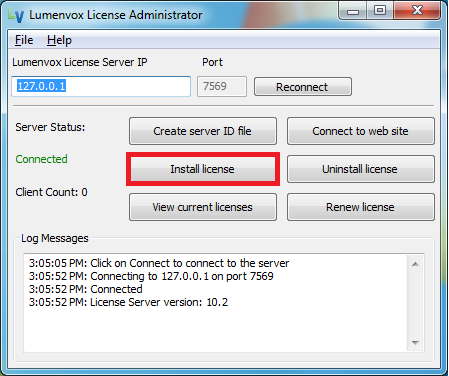
To install the license you just downloaded, you must first connect to the License Server:
- Go to Start > Programs > LumenVox > License Server > License Administrator.
- Type in the License Server's IP address. If the License Server is running on the machine you are using, the local machine's IP address is 127.0.0.1.
- Click "Connect." The server status should change to "Connected."
Once you have connected to the License Server, you need to install the license:
- Click "Install license."
- Select the license file just downloaded from the Web site.
-
The license should be installed.
You may now begin using your LumenVox Client (Speech Tuner, MediaServer, or custom API integration client) against the TTS Server or ASR server. If the Client is on a different computer from the License Server, you will want to configure where the Client checks for licenses.